Delayed loading of ajax content

Here is a JavaScript code that loads external data after holding the mouse pointer for a while over piece of content. Thus preventing the waste of bandwidth when moving too quickly over various items.

DEMO

As you can see I've used event delegation to attach appropriate event handlers. There are lots of benefits of using delegation instead of direct event handling such as:
1. Having more precise control of the event.
2. Handling events generated from 1000 items requires a delegation of 1 event handler to just 1 parent element of these items, which is far more efficient than the attaching an event handler to each of the 1000 items.

I've also got rid of all the callback / anonymous functions handling the events, which are now replaced by named functions. This way on each occurring event, no new function will be created/allocated in memory, instead the already defined named functions will be used. This is very useful especially if you must handle thousands of events requiring allocation of thousands new anonymous functions.
The small issues with Internet Explorer way of handling events are now also fixed. Enjoy!

function call_back(response, ret_el) {
    document.getElementById(ret_el).innerHTML = response;

}

function orange_fade_over(ev) {
    if (!ev.target) {
        ev.target = ev.srcElement;
    }
    var t = ev.target;

    if (t.tagName === 'LI') {
        var that = t.id;
        timer_id = setTimeout(function () {
            var c_id = that.match(/id([0-9]+)/)[1];
            if (cache_array.indexOf(c_id) == -1) {
                makeGETRequest('get_comment.php?comment_id=' + c_id, that, call_back);
                cache_array.push(c_id);
            }
        }, 250);
        return false;
    }
}

function orange_fade_out(ev) {
    var t = ev.target;
    if (t.tagName === 'LI') {
        clearTimeout(timer_id);
        return false;
    }
}

var orange_table;
if (orange_table = document.getElementById('orange_fade')) {
    var cache_array = [];
    var timer_id;

    if (orange_table.addEventListener) {
        orange_table.addEventListener('mouseover', orange_fade_over, false);
        orange_table.addEventListener('mouseout', orange_fade_out, false);
    } else if (orange_table.attachEvent) {
        orange_table.attachEvent('onmouseover', orange_fade_over);
        orange_table.attachEvent('onmouseout', orange_fade_out);
    }

}


function makeGETRequest(url, ret_el, callback_function) {
    var cursor = document.getElementsByTagName("body").item(0).style.cursor;

    var http_request = false;
    var activex_ids = ['MSXML2.XMLHTTP.3.0', 'MSXML2.XMLHTTP', 'Microsoft.XMLHTTP'];
    if (window.XMLHttpRequest) {
        http_request = new XMLHttpRequest();
        if (http_request.overrideMimeType) {
            http_request.overrideMimeType('text/xml');
        }
    } else if (window.ActiveXObject) {
        for (i = 0; i < activex_ids.length; i++) {
            try {
                http_request = new ActiveXObject(activex_ids[i]);
            } catch (e) {}
        }
    }
    if (!http_request) {
        alert('Please update your browser!');
        return false;
    }
    var return_el = document.getElementById(ret_el);
    if (return_el !== null) {
        return_el.innerHTML = "...";
    }
    cursor = "wait";
    http_request.onreadystatechange = function () {
        if (http_request.readyState !== 4) {
            return;
        }
        if (http_request.status !== 200) {
            alert('Error occurred while processing your request. Please try again later.');
            cursor = "auto";
            return;
        }
        cursor = "auto";
        var response = http_request.responseText;
        callback_function(response, ret_el);
        return;
    };
    http_request.open("GET", url, true);
    http_request.send(null);
}
by Nevyan Neykov


PHP lessons - simple login

A complete login form that checks given username/password combination and set $_SESSION['logged_in'] variable on success; Here is the SQL structure of the table users which you'll have to create via phpmyadmin for example:
CREATE TABLE IF NOT EXISTS `users` (
  `user_id` tinyint(5) NOT NULL AUTO_INCREMENT,
  `username` varchar(15) COLLATE latin1_general_ci NOT NULL,
  `password` varchar(15) COLLATE latin1_general_ci NOT NULL,
  PRIMARY KEY (`user_id`)
);

If you wish you can also add users via:
INSERT INTO `users` (`user_id`, `username`, `password`) VALUES (1, 'test', 'test');

Here is the whole working php code:
<?
$output     = "";
$login_form = '<form action="login_form.php" method="post">
<label for="username">Username:</label>
<input type="text" name="username" />
<label for="password">Password:</label>
<input type="text" name="password" />
<input type="submit" value="Login" name="login_submit"/>
</form>';

//check if user & password combination exist in database, returns false if otherwise
function check_login($username, $password)
{
    $dbhost = 'localhost';
    $dbuser = 'root';
    $dbpass = '';
    $dbname = 'cdcol';
    $link   = mysql_connect($dbhost, $dbuser, $dbpass);
    if (!$link) {
        die('Not connected : ' . mysql_error());
    }
    $db_selected = mysql_select_db($dbname, $link);
    if (!$db_selected) {
        die('Please change your database name : ' . mysql_error());
    }
    $sql = "select * from users where username='$username' and password ='$password' LIMIT 1";
    $result = mysql_query($sql) or die('Please change your mysql query !');
    $row = mysql_fetch_assoc($result);
    if (empty($row))
        return false;
    else
        return $row;
}


if (isset($_POST['login_submit'])) {
    $logged_in = false;
    if (empty($_POST['username']) or empty($_POST['password'])) {
        $output .= "Please enter username and password!<br />";
        $output .= $login_form;
    } else {
        $username = filter_input(INPUT_POST, 'username', FILTER_SANITIZE_STRING); //filter input $_POST variables against mysql_injection
        $password = filter_input(INPUT_POST, 'password', FILTER_SANITIZE_STRING);
        if (check_login($username, $password)) {
            $cookie_path    = "/";
            $cookie_timeout = 3600; // set up cookie information in seconds
            session_set_cookie_params($cookie_timeout, $cookie_path);
            ini_set("session.gc_maxlifetime", "3600");
            ini_set("session.cache_expire", "180");
            ini_set('session.cookie_lifetime', "3600");
            session_start();
            session_regenerate_id(); //regenerate session_id against session fixing
            $_SESSION['logged_in'] = true;
            $output .= "You have successfuly logged in!";
        } else {
            $output .= "Wrong user or password <br />";
            $output .= $login_form;
        }
    }  
}

else
    $output .= $login_form;
echo $output;
?>
by Nevyan Neykov


Popup form with Javascript & CSS

Ready to use popup report form with radio buttons built using pure JavaScript and CSS. Try the report form demo HERE:

The css style:
<style>
#overlay {
     overflow: auto;
     position: fixed;
     left: 0px;
     top: 0px;
     width:100%;
     min-height:100%;
     z-index: 1000;
     background:rgba(0,0,0,0.6);
}

#overlay div {
     width:450px;
     margin: 100px auto;
     background-color: #fff;
     border:1px solid #000;
     padding:15px;
     text-align:left;
  box-shadow:0 4px 12px rgba(0, 0, 0, 0.4), 0 1px 0 rgba(255, 255, 255, 0.5) inset;
  border-radius:6px;
}

#upprev_close{
background:  white;
    border:0;
    color: #929292;
    float: right;
    font-weight: bold;
    margin: 0;
    padding: 0;
    text-transform: uppercase;
 cursor:pointer;cursor:hand;
}

#report_form input[type="radio"] {
   display:none;
}

#report_form  label {
    display:table;
    background-color:#ddd;
    padding:4px 11px;
 cursor:pointer;cursor:hand;
 border-radius:3px 3px 3px 3px;
 margin: 0.3em;
}

#report_form  input[type="radio"]:checked + label {
    background-color:#bbb;
 box-shadow: -1px 0 5px orange;
}

</style>
The HTML + JavaScript:
<script type="text/javascript">
function report(c_id) {
    var form = document.createElement("form", "report_form");
    form.id = "report_form";
    form.method = "post";
    form.action = "index.php?mode=post_comment";

    var reply_place = document.createElement("div");
    reply_place.id = "overlay";
    var inner_div = document.createElement("div"), button_close = document.createElement("button");
    button_close.id = "upprev_close";
    button_close.innerHTML = "x";
    button_close.onclick = function () {
        var element = document.getElementById('overlay');
        element.parentNode.removeChild(element);
    };
    inner_div.appendChild(button_close);

    var legend = document.createElement("legend");
    legend.innerHTML = "Why do you want to report this?";
    form.appendChild(legend);

    var input1 = document.createElement("input");
    input1.type = "radio";
    input1.id = "nudity";
    input1.value = "nudity";
    input1.name = "options";
    var radio_label1 = document.createElement("label");
    radio_label1.htmlFor = "nudity";
    radio_label1_text = "Nudity";
    radio_label1.appendChild(document.createTextNode(radio_label1_text));
    form.appendChild(input1);
    form.appendChild(radio_label1);

    var input2 = document.createElement("input");
    input2.type = "radio";
    input2.id = "attacks";
    input2.value = "attacks";
    input2.name = "options";
    var radio_label2 = document.createElement("label");
    radio_label2.htmlFor = "attacks";
    radio_label2_text = "Personal attack";
    radio_label2.appendChild(document.createTextNode(radio_label2_text));
    form.appendChild(input2);
    form.appendChild(radio_label2);

    var input3 = document.createElement("input");
    input3.type = "radio";
    input3.id = "spam";
    input3.value = "spam";
    input3.name = "options";
    var radio_label3 = document.createElement("label");
    radio_label3.htmlFor = "spam";
    radio_label6_text = "Spam";
    radio_label3.appendChild(document.createTextNode(radio_label6_text));
    form.appendChild(input3);
    form.appendChild(radio_label3);

    var submit_btn = document.createElement("input", "the_submit");
    submit_btn.type = "submit";
    submit_btn.className = "submit";
    submit_btn.value = "Report";
    form.appendChild(submit_btn);

    submit_btn.onclick = function () {
        var checked = false, formElems = this.parentNode.getElementsByTagName('input');
        for (var i = 0; i < formElems.length; i++) {
            if (formElems[i].type == 'radio' && formElems[i].checked == true) {
                checked = true;
                var el = formElems[i];
                break;
            }
        }
        if (!checked) return false;
        var poststr = "c_id=" + c_id + "&reason=" + encodeURI(el.value);
        alert(poststr);
        return false;
    }

    inner_div.appendChild(form);
    reply_place.appendChild(inner_div);

    var attach_to = document.getElementById("wrapper"), parentDiv = attach_to.parentNode;
    parentDiv.insertBefore(reply_place, attach_to);

}
</script>


<span style="cursor:pointer;cursor:hand;" onclick="report(127);">Report this!</span>
<div id="wrapper"></div>

As you can see to trigger the modal form you'll have to run the function report( ); while as its parameter you can pass the id of item, article or comment you want to report. by Nevyan Neykov


Facebook wall comments with JQuery

Here is an implementation of the Facebook wall posts using JQuery: You can test it here: DEMO

(JavaScript + php files included in the package)

Go ahead and try it! by Nevyan Neykov


How to test your PC reliability

It's always good to know that your computer is stable. This way you'll ensure running critical operations smoothly without any crashing. Here I'll show you a few reliable programs for CPU and memory testing.

How to test the CPU
I've been using IntelBurnTest which includes Intel libraries used exclusively for CPU testing prior its market release. IntelBurnTest software is compatible with AMD processors and tests faster than Prime95. Just make sure that your testing system is equipped with a proper cooling.
Tips:
Prior testing please download and run Realtemp - this way you can watch in real-time the temperature - and make sure it's below 70°C.
Prime counts determines the memory size used in the test.
Residual values must be equal or less e^-09 i.e. e^-10, e^-11, and so on.
Residual Normalized should be between e^-02 and e^-04. (from 0.01 to 0.0001)
Numbers outside these ranges indicate that you experience memory or CPU errors.
Try at least 10 or 20 passes.
When having more than 2 GB RAM running on the 32-bit version of Windows please use the tests on a 64 bit version of Windows in order to allocate the whole memory(above the 2GB addressing space).


Here are the 32 bit
http://www.ultimate-filez.com/files/IntelBurnTest.zip

and the 64 bit version
http://www.ultimate-filez.com/files/IntelBurnTest-x64.zip

Linux users could use: http://www.netlib.org/benchmark/hpl/

you may also try:
http://systester.sourceforge.net/downloads.html
and CPU Stability Test

Memory testing
I've been using: memtest86+

http://www.memtest.org/

SuperPI mod
http://www.techpowerup.com/downloads/366/

If during work you happen to see: picture flickering, activation and deactivation of small pixels on the screen or computer halts after heavy usage it's probably your video card or the installed memory slots. If however after testing your memory with memtest86 the problems persists and your video card is embedded then your filtering capacitors are getting old or just don't function properly. They pollute the data stored in your computer memory - remember that its shared memory is being used by the video card. In such case it's better to replace the capacitors with new ones. by Nevyan Neykov


Improving Adsense eCPM / RPM and CPC

There are some things that anyone could do to increase his/her incomes when using Adsense.

1. Decrease your ad units count
Second and third ad spot clicks are not so-profitable as the first ones. Also when having 15 ad links on a page and the user clicks on only 1 then your eCPM will start to get low, because this way the advert impressions are growing but the clicks are staying same.

2. Rearrange ad spots
Look at your adsense performance tab: and if you have higher CPC on your middle positioned ad(ie it is getting more clicks) then place it to appear first in your HTML code, then re-position it with CSS to the place where it's getting those clicks.

3. Add more useful content to the page
You can use Google Analytics or other web statistics software to see the average time of stay on your pages. This way you might find the pages that need to be enriched or rewritten. And if you manage to increase visitors stay time then your eCPM will surely grow!
 
Next lets discuss how to increase your adsense earnings by improving the eCPM ( RPM ) parameter.

4. Direct hits and RPM
By definition RPM is ' the amount of revenue you can expect to earn from AdSense for every 1000 impressions shown on your site ' which is something totally different from how much 1000 impressions on your site actually cost!

And as you can see from this video:


in order to have high eCPM you'll have to ensure unique visitors are clicking on your ads.

But first lets see how to recognize some of the actions that "repeated" users (or our direct traffic hits) perform. They usually:
-  type the URL in the browser / open a new tab or access the url from bookmarks.
-  come from links found in email / newsletter, Word or PDF files.
-  come from redirects (301 header redirect, javascript or meta refresh tags)

As you might have seen in the video above there's an inverse connection between your eCPM value and the traffic you have. In other words: receiving more mixed(not unique) traffic in effect will only lower your eCPM.
And here is a sample screen-shot from Google analytics confirming that about 95% of one site's earnings came exactly from search traffic:
search vs direct traffic revenue

Filtering direct hits
So as you can see our first priority becomes not the obvious one to get more traffic in order to display more ads, but to display relevant ads to our organic public segment only ( i.e. users coming from search engine queries) . This way we'll be displaying less ads, but the eventual incoming clicks are going be much more valuable.

Here is simple php script that will filter out most of the direct hits and display advertisement only to users coming from google:
Assuming that your adsense code is placed in the variable $ads;
<?if (strstr($_SERVER['HTTP_REFERER'], "google")) { echo $ads; }
?>

or the more generic one: displaying ads on the referral only traffic by filtering out hits generated from your own domain:
<?
$referer = parse_url($_SERVER['HTTP_REFERER']);
$my_domain = parse_url($_SERVER['HTTP_HOST']);
if (!strstr($referer['host'], $my_domain['host'])) {echo $ads; }
?>

5. Increasing bounce rate
I know that this may sound very frustrating like everyone out there is suggesting just the opposite, but after watching the video you may start thinking about it.

That's it, don't forget to write unique content and I hope this post helps you actually increase your adsense earnings! by Nevyan Neykov


SEO penalty checklist: thin content

First off thin content is a not so easy to explain term, but because it had become more popular during the Panda update here are some things that you can do in order to represent your website in more favorable light in front of the search engines. Some examples and fixes of thin content follow:

1. Target: Duplicate content caused by sessions, referral or page order/filtering parameters appended to the end of the page like: ?orderby=desc that don't change the actual content on the page or just reorders the same content. Also if your website have AJAX back button navigation, or just a login system with session IDs appended to the end of the url, as well as frames with tracking ids attached. Just look at the different urls on picture below, representing same content:duplicate content from url
URL parameters, like session IDs or tracking IDs, cause duplicate content, because the same page is accessible through numerous URLs. 
Solution (to session appended urls):
After long searching the following technique from webmasterworld's member JDmorgan succeeded to get ~90% of my website content fully indexed. Here is how to implement this technique on practice using apache .htaccess.
Just put the following lines in your .htaccess file and test:

1) Allow only .html pages to be spidered
#allow only .html requests
RewriteCond %{query_string} .
RewriteRule ^([^.]+)\.html$ http://your_web_site.com/$1.html? [R=301,L]
2) Remove all the sessionid parameters when a page is being called by bots
#remove URL sessionids
RewriteCond %{HTTP_USER_AGENT} Googlebot [OR]
RewriteCond %{HTTP_USER_AGENT} Slurp [OR]
RewriteCond %{HTTP_USER_AGENT} msnbot [OR]
RewriteCond %{HTTP_USER_AGENT} Teoma
RewriteCond %{QUERY_STRING} ^(([^&]+&)+)*PHPSESSid=[0-9a-f]*&(.*)$
RewriteRule ^$ http://your_web_site.com/?%1%3 [R=301,L]

2. Target: 301 header redirects chain
A chain of 301 redirects could cause you a loss of PageRank i.e. lead to thin content. So please check that your 301 redirects are final i.e. they point to an end page and not to another redirect page. You can use for Firefox's LiveHTTPHeaders extension to do this kind of check.

Solution:
fix your redirects!


3. Target: Because it is thin
Pages with content < 150 words or 10 visits during the whole year. You can check out the latter with Google analytics by looking at your content pages, ordered by page-views setting time range of 1 year backwards. Find and fix those urls!

Solution:
Either remove/nofollow or block with robots.txt or rewrite/merge the content.

4. Target: Heavy internal linking:
By placing multiple links on a page to pages/tags/categories you are reducing the particular page's power. This way only few pages supported by lots of incoming internal links are considered as not thin by Google Panda.

Solution:
You need to clean up the mistaken links on that page by adding rel = "nofollow" to the outgoing links or better remove (rearrange to bottom) the whole section(tag cloud, partner links etc...) from your website.


5. Target: Percentage of urls having thin content
Google maintains two indexes: primary and supplemental. Everything that looks thin or not worthy(i.e. doesn't have enough backlinks) goes to the supplemental. Factor when determining thin content is the percentage of indexed and available via search to its supplemental pages a particular website might have. So the more pages you maintain in Google's primary index the better. It is possible that your new (already fixed) and old (thin) content now fight for position on Google's search. Remember that the old content already have Google's trust with its earlier creation date and links pointing to, but it is still thin!

Solution:
Either redirect the old to the new url via 301 permanent redirect or log in at Google's Webmaster tools then from Tools->Remove URL typed your old URLs and wait. If you get Status denied, you'll have to manually meta noindex, nofollow them or deny them in your robots.txt file.


Q: How to find thin content urls more effectively?
Sometimes when you try to find indexed thin content via: site:http://yourwebsite.com you wont see their full list.

Solution:
  • use the parameter "-" in your query:
    First do a site search site and then consecutively remove the known and valid URLs from the results.
    "site:http://yourwebsite.com -article"
    will remove all urls like article-5.html, article-100.html etc... This way you'll see the thin content pages more quickly.
  • when you know the thin content page name just do
    site: http://yourwebsite.com problematic_parameter
    ( ie.:"site:http://yourwebsite.com mode" this will show all of the indexed modes of your website like: mode=new_article, mode=read_later, mode=show_comment etc... Find out the wrong ones and do a removal request upon them. )


Enjoy and be welcomed to share your experience!
---
P.S. If you don't have an access to .htaccess file you could achieve the above functionality using the canonical tag - just take a look at these SEO penalty checklists series.
More information on the dynamic urls effect to search engines as well as how to manage them using yahoo's site explorer you can find here: http://help.yahoo.com/l/us/yahoo/search/siteexplorer/dynamic/index.html by Nevyan Neykov


Online spyware removal

spyware


If you are interested in choosing between different types of antispyware products
you can also read these antivirus software reviews.

Here is a list of free online anti-spyware tools that will help you to clean up a PC from spyware trojans and viruses. Compared with the standard anti virus software they have:
  • Advantages:
    - no need of application installation on your computer.
    - online scanners use latest antivirus definitions.

  • Disadvantages:
    - some online scanners like Kaspersky online scanner:
    http://www.kaspersky.com/virusscanner
    and
    Panda Active Scan
    http://www.pandasecurity.com/activescan/index/

    list only viruses they find without cleaning them. (Panda Active scan actually only finds viruses but cleans up spyware).  They could be used for a system check only.

    The following compact anti-spyware tools are of a small size that will not affect your system's performance. They wont slow down your applications loading time. So give them a try and don't forget to update their definitions first!

    e
    Trust PestPatrol Anti-Spyware from ComputerAssociates:
    http://www.pestpatrol.com/ http://cainternetsecurity.net/entscanner/

    McAffee freescan:
    http://home.mcafee.com/downloads/free-virus-scan

    A-squared Web Malware Scanner:
    http://www.emsisoft.com/en/software/ax/

    Webroot SpySweeper:
    http://www.webroot.com/land/installation_instructions.php
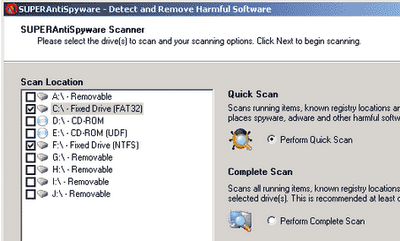
    SuperAntiSpyware makes a sophisticated spyware analysis on your systemsuper anti spyware
http://www.superantispyware.com/superantispywarefreevspro.html
  • Anti-Spyware for the web from TrendMicro HouseCall
    http://housecall.trendmicro.com/

  • Windows Security Essentials
    http://windows.microsoft.com/en-US/windows/products/security-essentials

  • Norton's Symantec on-line security scan and virus detection
    http://security.symantec.com/sscv6/home.asp

  • BitDefender's on-line scanner:
    http://quickscan.bitdefender.com/

  • F-Secure Online Virus Scanner:
    http://www.f-secure.com/en_EMEA-Labs/security-threats/tools/online-scanner

    f-secure


  • ArcaMicroScan
    http://www.arcabit.com/online_scanner
    (first you need to download and install the supporting libraries)


  • ESET / NOD32 Online Scanner -
    http://www.eset.com/home/products/online-scanner/

Before you scan your PC
Some of the on line scanners require specific access to run. Under Windows XP if you notice at the upper part of the screen the Information Bar click on it and select Enable, Install or Run file from the context menu.
Information Bar


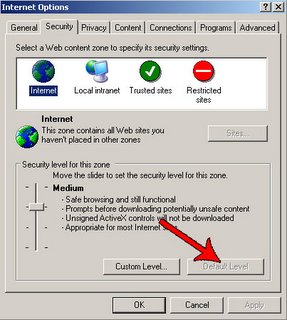
Some online scanners work in Internet Explorer browser only and require ActiveX controls to be turned on. You can enable ActiveX by switching to menu Tools on Internet Explorer:

Internet explorer security options
1. Go to Internet Options.
2. Then on the Security tab, click on Default Level.

Other way of enabling ActiveX is to add the antivirus program's website to your Trusted sites:
1. Go to Internet Options -> Security Tab -> Trusted sites.
2. For the Security Level for this zone click on the button Custom level...
3. Fill in the full address of the website you want to have access to in the input field Add this website into this zone & uncheck the mark on Require server verification(https:) for all sites in this zone.
4. Check the availibility of ActiveX scripting in Internet Explorer. In the field Security level for this zone click on Custom level button and under ActiveX controls and pluggins enable:

Automatic Prompting for ActiveX controls
Download Signed ActiveX controls
Download Unsigned ActiveX controls
Initialize and run ActiveX controls that are not marked as safe
Run ActiveX controls and plug-ins
Script ActiveX controls marked safe for scripting


Virus removal tools
They need to be downloaded and run as standalone applications:
Avira:
http://www.avira.com/en/downloads

BitDefender:
http://www.bitdefender.com/site/Download/browseFreeRemovalTool/

AVG:
http://free.avg.com/us-en/virus-removal

Symantec:
http://www.symantec.com/business/security_response/removaltools.jsp

AVAST:
http://www.avast.com/eng/avast-virus-cleaner.html

Kaspersky:
http://www.kaspersky.com/virus-removal-tools

McAffee:
http://www.mcafee.com/us/downloads/free-tools/stinger.aspx

Norman:
http://www.norman.com/support/support_tools/malware_cleaner/

And if you think that you have a possibly infected file you can always send it for a check to:
http://virusscan.jotti.org/


Protection tool:
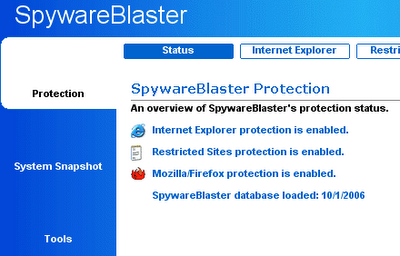
SpywareBlaster - prevents the installation of spyware, adware, dialers, browser hijackers, and other potentially unwanted programs. It will also protect your Internet browser.
Usage
:

  1. Under “Quick Tasks” click “Download Latest Protection Updates”.
  2. Click the “Check for Updates” button.
  3. After updating, click “Protection” near the top.
  4. Under “Quick Tasks” click “Enable All Protection”.
spyware blaster
http://www.javacoolsoftware.com/spywareblaster.html


How to save time?
Instead of testing all the on-line scanners you can first run a quick check & clean procedure with Dr.web's CureIt from:
ftp://ftp.drweb.com/pub/drweb/cureit/launch.exe
Run the application and go to Options > Change settings. Choose the "Scan tab" and Uncheck "Heuristic analysis". Then click on the Start Scanning button.

Last but not least you must definitely try the great free Anti-malware scanner/cleaner offered from MalwareBytes:
http://www.malwarebytes.org/mbam.php

Happy cleaning! by Nevyan Neykov